
Introduction: The Silent Guardian of Every Link You’ve Ever Clicked
Think about the last time you clicked a link and it just worked. No broken page. No confusing error message. No garbled text at the top of your browser. That seamless experience didn’t happen by accident — it happened because somewhere in the chain, a URL encoder quietly did its job.
Most people who use the internet every day have never heard of a URL encoder, and that’s actually a sign that it’s working exactly as intended. It operates behind the scenes, invisibly converting characters that web addresses can’t natively support into a format that every browser, server, and application on the planet can understand without confusion.
But for developers, digital marketers, SEO professionals, and anyone who builds or manages websites, understanding the URL encoder isn’t just useful — it’s essential. Mishandled encoding is one of the most common causes of broken links, failed API calls, corrupted tracking parameters, and frustrating debugging sessions that eat up hours of productive time.
This guide takes you from the absolute basics all the way through to advanced practical applications. By the time you finish reading, you’ll know how a URL encoder works, when and why to use one, which tools deserve your trust, and how to avoid the encoding mistakes that silently break things in ways that are surprisingly hard to trace.
What Exactly Is a URL Encoder?
The Technical Foundation in Plain Language
A URL encoder is a mechanism — either a tool, a function, or a built-in system process — that converts characters in a web address into a format that can be safely transmitted across the internet. The underlying process is called percent-encoding, a standard defined in RFC 3986, the technical specification that governs how Uniform Resource Identifiers (URIs) are structured and used.
The internet’s infrastructure was originally designed around a limited set of characters. Specifically, only the 26 letters of the Latin alphabet (both upper and lower case), the digits 0 through 9, and a small number of special symbols were designated as “safe” for use in a URL without any modification. Everything outside that safe set — spaces, ampersands, equals signs used as data, accented letters, emoji, non-Latin scripts, and dozens of other characters — has to be converted before it can travel safely through the web.
A URL encoder performs that conversion, and does it using a method that is both simple and universally recognized.
How Percent-Encoding Actually Works
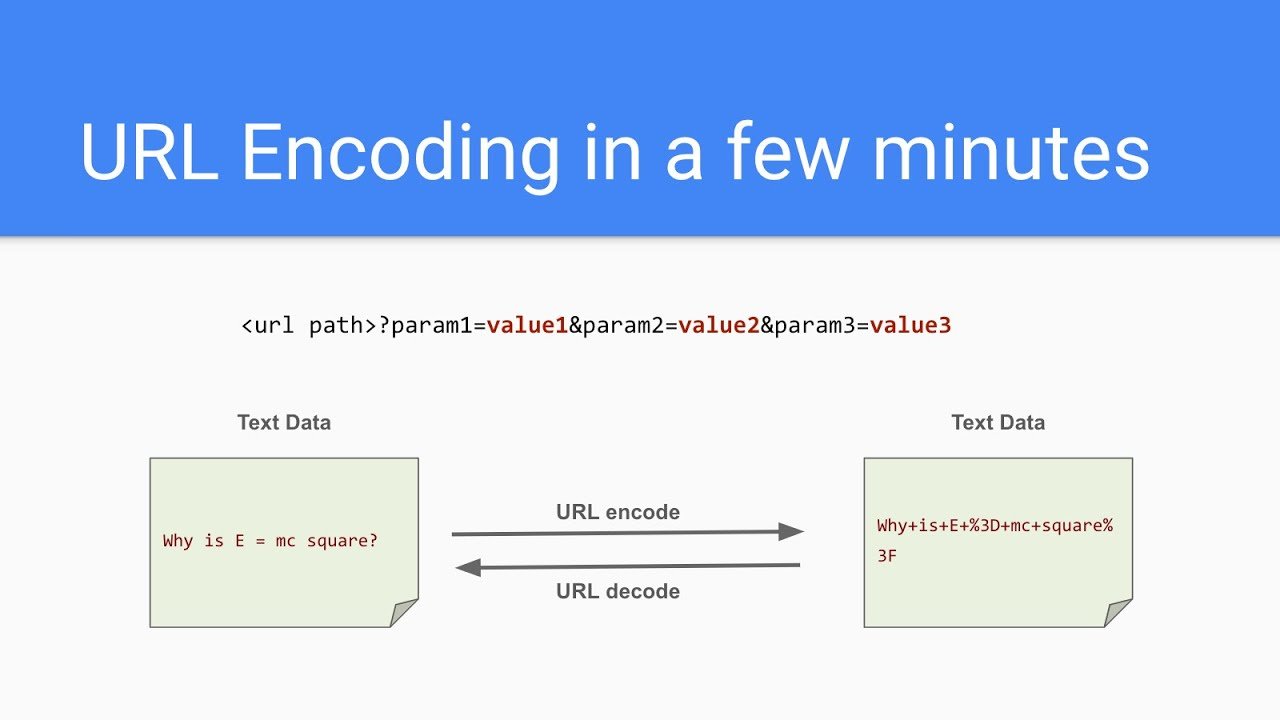
The encoding method itself is elegant. When the URL encoder encounters a character that cannot appear safely in a web address, it looks up that character’s value in the UTF-8 character encoding standard. UTF-8 expresses every character as one or more bytes, and each byte is represented as a two-digit hexadecimal number. The URL encoder then takes that hexadecimal number and adds a percent sign in front of it.
The result is called a percent-encoded sequence. A space, for example, has a UTF-8 byte value of 32 in decimal, which is 20 in hexadecimal. So the URL encoder converts a space into %20. An exclamation mark becomes %21. An at sign becomes %40. A copyright symbol — which requires two bytes in UTF-8 — becomes %C2%A9.
When a browser or server receives a URL containing these sequences, it decodes them back into the original characters automatically. The whole process is bidirectional and lossless: encode, transmit, decode, and you end up right back where you started.
Why URL Encoding Matters More Than Most People Realize
The Real Cost of Skipping Encoding
If you’ve ever wondered why a link you copied and pasted into an email didn’t work for the recipient, or why an API call that looked perfectly correct in your code kept returning errors, or why a web form submission seemed to lose data between the user’s browser and your server — encoding problems are among the most likely culprits.
The consequences of skipping proper URL encoding range from mildly annoying to genuinely damaging. A broken campaign tracking URL means you lose attribution data for paid advertising, making it impossible to know which channel drove a conversion. A malformed API request means your application can’t communicate with a third-party service, which can cascade into user-facing errors or data failures. A poorly encoded redirect URL can send users to the wrong page entirely.
None of these failures are obvious. They don’t announce themselves with clear error messages pointing to “encoding problem.” They just silently misbehave, and the debugging process that follows is often long and frustrating precisely because encoding isn’t the first thing developers think to check.
URL Encoding and SEO: A Connection Often Overlooked
The relationship between the URL encoder and search engine optimization is real and worth understanding. Search engines like Google crawl and index your URLs as part of the process of understanding and ranking your content. URLs that contain improperly encoded characters can create a range of SEO problems.
The most significant issue is duplicate content. When the same page is accessible via multiple URL variations — some with encoded characters, some without, some with different encoding schemes — search engines may treat each variation as a separate page. This splits any ranking authority between multiple addresses instead of concentrating it on one canonical URL, which dilutes your SEO impact.
Google’s own documentation recommends using UTF-8 encoded URLs and consistently applying percent-encoding. Ensuring that your URLs are properly encoded — and that your canonical tags and sitemaps reflect the correct encoded versions — is a small but meaningful part of a technically sound SEO strategy.
The Different Types of Characters in a URL
Reserved Characters: Structural vs. Data Roles
Not all characters in a URL are created equal, and understanding the distinction is key to using a URL encoder correctly. Characters in a URL fall into several categories, each treated differently by the encoding process.
Reserved characters are those that have specific structural jobs in a URL. The forward slash / separates path segments. The question mark ? marks the beginning of a query string. The ampersand & separates query string parameters from each other. The equals sign = separates a parameter name from its value. The hash # marks the beginning of a fragment identifier.
These characters should only be encoded when they appear as data — that is, when they’re part of the content being passed as a parameter value rather than part of the URL’s structure. If a user’s name includes an ampersand (like “Tom & Jerry Products”), that ampersand in the query value absolutely must be encoded to %26. If it’s left raw, the server will think it’s the end of one parameter and the beginning of another, corrupting the data entirely.
Unreserved Characters: The Safe Set
Unreserved characters are those that can appear in a URL without any encoding whatsoever. These are the letters A through Z in both cases, the digits 0 through 9, the hyphen -, the underscore _, the period ., and the tilde ~. A URL encoder leaves these characters exactly as they are.
Everything else — every character outside this safe set that isn’t performing a structural function — must be encoded. This includes characters that seem innocent, like the plus sign, the comma, the colon, the semicolon, square brackets, and parentheses, as well as all non-ASCII characters including accented vowels, characters from non-Latin scripts, and symbols.
Where URL Encoding Applies in Real-World Practice
Query Strings and Marketing Campaigns
One of the most practically important applications of a URL encoder for non-developers is in marketing campaign links. UTM parameters — the tracking codes appended to URLs for analytics purposes — are a standard part of digital marketing workflows. These parameters pass values like campaign names, ad content descriptions, and source labels through the URL.
Campaign names and ad descriptions frequently contain characters that require encoding. A campaign named “Summer Sale 2026 — 50% Off” contains spaces, a dash used as a punctuation mark, and a percent sign, all of which need to be encoded before they can travel safely in a URL. Running that campaign link through a URL encoder before distributing it ensures that your analytics platform receives clean, accurate data on the other end.
API Development and Integration Work
For developers working with APIs, the URL encoder is a daily tool. GET request parameters are passed through the URL, and those parameters often contain values that users have typed in — search terms, addresses, names, phone numbers, and countless other inputs that can contain any character imaginable.
A user who searches for “café” on your platform generates a query with an accented character. A user who enters their business name as “O’Brien & Sons” generates a query with an apostrophe and an ampersand. Without a URL encoder processing those values before they’re appended to the request URL, the API call will either fail outright or transmit corrupted data.
Most programming languages include built-in URL encoder functions precisely because this need is so universal and so constant. But knowing when and how to apply them correctly — which characters to encode, which to leave alone, and how to handle edge cases — is knowledge that comes from understanding the underlying principles, not just memorizing a function name.
Internationalized Web Addresses
The global nature of the modern web has made the URL encoder more important than ever. Billions of people browse the internet in languages that use non-Latin scripts — Arabic, Hindi, Chinese, Japanese, Korean, Thai, and many others. When URLs need to contain characters from these scripts, encoding becomes the bridge that makes those addresses usable across different systems and server configurations.
An Internationalized Resource Identifier (IRI) can be written using native script characters, but when it needs to be transmitted over HTTP or embedded in HTML, it must be converted to its percent-encoded form. The URL encoder handles this conversion, turning what might look like a simple-looking web address in Japanese characters into a long string of percent-encoded sequences that every server on the internet can interpret consistently.
The Most Common URL Encoding Mistakes and How to Avoid Them
Encoding the Entire URL Instead of Its Components
This is the single most widespread mistake people make when using a URL encoder. The instinct is understandable — if encoding makes URLs safe, surely encoding the whole URL makes it even safer. But the logic breaks down when applied to the structural elements of the URL.
Encoding a full URL converts the :// after the protocol into %3A%2F%2F, turns every / in the path into %2F, and converts the ? and & characters that hold the query string together into %3F and %26. The result is a string that no browser can parse as a web address, because all the characters that define its structure have been obscured.
The correct approach is to use a URL encoder on individual components — specifically, on the values of query string parameters and on path segments that contain non-safe characters. The structural characters that connect those components are left exactly as they are.
The Double-Encoding Trap
Double-encoding happens when an already-encoded string gets run through a URL encoder a second time. The percent signs that were inserted by the first encoding pass are themselves percent-encoded in the second pass, turning %20 into %2520. When the receiving system tries to decode that, it gets %20 back rather than the original space — meaning the data never arrives in its intended form.
Double-encoding is particularly common in systems where URL encoding happens at multiple layers — for example, in a web framework that encodes parameters before passing them to a function that also encodes them. Careful code review and testing are the best defenses, along with always decoding a string before encoding it if you’re not certain of its current state.
Using the Wrong Encoding Function
In JavaScript alone, there are two distinct URL encoder functions — encodeURI() and encodeURIComponent() — and confusing them is a very common source of bugs. The encodeURI() function is designed to encode a full URL, so it deliberately leaves structural characters like /, ?, &, =, and # untouched. The encodeURIComponent() function is designed to encode individual parameter values, so it encodes those same structural characters.
Using encodeURI() when you meant to use encodeURIComponent() means that structural characters embedded in your parameter values don’t get encoded, allowing them to be misinterpreted. Using encodeURIComponent() when you meant encodeURI() means you accidentally encode the structural characters that hold your URL together. Knowing which function to reach for, and why, is one of the most practically valuable things a web developer can learn about URL encoding.
Choosing and Using a URL Encoder Tool
What to Look For in a Reliable Tool
Whether you’re a developer who needs a quick check or a marketer who regularly works with campaign links, having a reliable online URL encoder in your bookmarks is worthwhile. When evaluating tools, a few qualities matter most.
The tool should clearly state that it uses UTF-8 encoding — the W3C-recommended standard for all modern web applications. It should allow you to encode individual components rather than forcing you to submit an entire URL. It should offer decoding functionality alongside encoding, since you’ll frequently need to reverse the process. And it should be responsive, straightforward, and free of excessive advertising or misleading upsells.
Established, well-regarded tools include urlencoder.io, urlencoder.org, and the encoder built into FreeFormatter.com. Each of these handles UTF-8 encoding properly and provides both encode and decode functions in a clean interface.
When to Use a Built-In Language Function Instead
For developers, built-in language functions are almost always preferable to online tools for production work. JavaScript’s encodeURIComponent(), Python’s urllib.parse.quote(), PHP’s rawurlencode(), and Java’s URLEncoder.encode() are all available without any external dependency and can be incorporated directly into your application’s logic.
Using a built-in function means encoding happens automatically and consistently as part of your data flow, rather than requiring a manual step. It also means you can write tests around your encoding logic, catch problems early in development, and handle edge cases programmatically rather than catching them after deployment.
Conclusion: Make the URL Encoder a Natural Part of Your Workflow
Every professional who works with the web — whether writing code, managing marketing campaigns, building integrations, or publishing content — deals with URLs constantly. And yet encoding is one of those foundational topics that most people only encounter when something goes wrong, when a link breaks or a parameter disappears or an API returns a cryptic error.
The goal of understanding a URL encoder isn’t to add complexity to your workflow. It’s to remove a hidden source of friction — one that causes problems quietly, inconsistently, and in ways that are genuinely hard to trace without knowing where to look.
Use a URL encoder on every query string value that might contain non-safe characters. Apply it at the component level, not the full URL level. Use your programming language’s built-in functions for production code, and keep a reliable online tool handy for quick testing and verification. And when something breaks in a way that doesn’t immediately make sense, add URL encoding to your checklist of things to check — because it may well be the answer.
The internet runs on correctly encoded URLs. Now you know how to make sure yours are always among them.
FAQs
What is a URL encoder used for?
A URL encoder is used to convert characters that cannot appear safely in a web address into a percent-encoded format that browsers, servers, and web applications can reliably interpret. This includes spaces, special symbols, accented characters, and non-Latin script characters. URL encoding is essential for query string parameters, API requests, marketing tracking links, form submissions, and any context where data containing arbitrary characters needs to be transmitted as part of a URL. Without proper encoding, URLs break, data gets corrupted, and applications fail in ways that can be very difficult to diagnose.
What is the difference between URL encoding and Base64 encoding?
URL encoding and Base64 encoding are both methods of representing data in a safe, transmittable format, but they serve different purposes and work differently. URL encoding — specifically percent-encoding — converts individual characters into %xx sequences and is designed specifically for making web addresses safe for transmission over HTTP. Base64 encoding converts binary data into a text string using 64 printable ASCII characters and is commonly used for encoding file attachments, images, and binary payloads in contexts like email or JSON APIs. The two are not interchangeable: URL encoding is for URLs; Base64 encoding is for binary data that needs to be represented as text.
Does URL encoding affect SEO?
Yes, URL encoding can affect SEO in meaningful ways. Inconsistent or incorrect encoding can lead to duplicate content issues, where the same page is indexed under multiple URL variations. It can also cause crawl errors if Googlebot encounters malformed URLs. Google recommends using UTF-8 encoded URLs and consistent percent-encoding for any non-ASCII characters. For best results, ensure that your canonical tags, sitemaps, and internal links all reference the correctly encoded version of your URLs, and use a consistent approach to encoding across your entire website.
Why does a space become %20 in a URL and not just a space?
A space cannot appear literally in a URL because the URL specification defines only a limited set of characters as “safe” for direct use in a web address. Spaces are not in that safe set because they are ambiguous — a space could indicate the end of a URL or the beginning of a new one, depending on the system parsing it. The solution is percent-encoding: a space has a UTF-8 byte value of 32 in decimal, which equals 20 in hexadecimal, so it becomes %20 when encoded. You may also see spaces represented as + in some older systems that use the application/x-www-form-urlencoded format — but %20 is the correct and universally accepted encoding in modern URLs.
How do I URL encode a string in JavaScript?
JavaScript provides two built-in URL encoder functions. Use encodeURIComponent() when you need to encode an individual query string parameter value — this function encodes all characters except letters, digits, hyphens, underscores, periods, and tildes. Use encodeURI() when you need to encode a complete URL — this function leaves structural characters like /, ?, &, and = untouched. For example, encodeURIComponent("hello world & more") returns "hello%20world%20%26%20more", which is safe to use as a parameter value. Choosing between these two functions correctly is one of the most important URL encoding decisions in JavaScript development.
RFC 3986 – Uniform Resource Identifier (URI): Generic Syntax